



How to Set Up Instagram DM Automation for Hypnosis Leads (Without Sounding Like a Robot)
Let me tell you about the Instagram DM problem that's quietly killing your practice growth.
You run ads. People respond. They DM you asking for "more information." You manually type out a response. They ask another question. You respond again. They go silent. You forget to follow up. The lead dies.
Rinse and repeat 5-8 times per day.
Sound familiar?
During our recent mastermind call, Mary shared her exact struggle. She was getting great engagement on her $49 hypnosis session ads, but she was drowning in manual DM responses. Worse, she'd tried automating it and people stopped responding entirely.
Her automated messages were killing conversations, not starting them.
Here's how we fixed it—and how you can do the same.
The Fatal Flaw in Most DM Automations
Mary's first attempt at automation sent an immediate, lengthy paragraph the moment someone messaged her.
The result? People immediately knew they were talking to a bot. Conversation over.
Here's what most people don't understand: Automation shouldn't replace humanity—it should enhance your ability to BE human at scale.
The problem wasn't automation itself. The problem was HOW she automated.
The 60-Second Rule
Here's the first secret: Add a wait step.
When someone sends you a DM, don't respond instantly. Wait 60 seconds. Maybe even 90.
Why? Because no human responds in 2 seconds. That instant response screams "robot" louder than any poorly written message ever could.
In platforms like GoHighLevel (which powers our Pykthos system), you can easily add a wait step to any automation workflow:
Trigger: Instagram DM received
Step 1: Wait 60 seconds
Step 2: Send response
That one simple change makes your automation feel 10x more human.
The Personalization That Actually Works
Here's the second secret: Use their name, but use it right.
Mary was copying and pasting the same paragraph to everyone, then manually deleting the previous name and typing in the new one. Every. Single. Time.
There's a better way.
Most automation platforms support "merge fields"—those little codes that automatically pull in personal information. In GoHighLevel, it looks like this:
{{contact.first_name}}
When the automation runs, it automatically replaces that code with the person's actual first name.
So instead of:
"Hi! Thanks for reaching out about hypnosis sessions..."
You get:
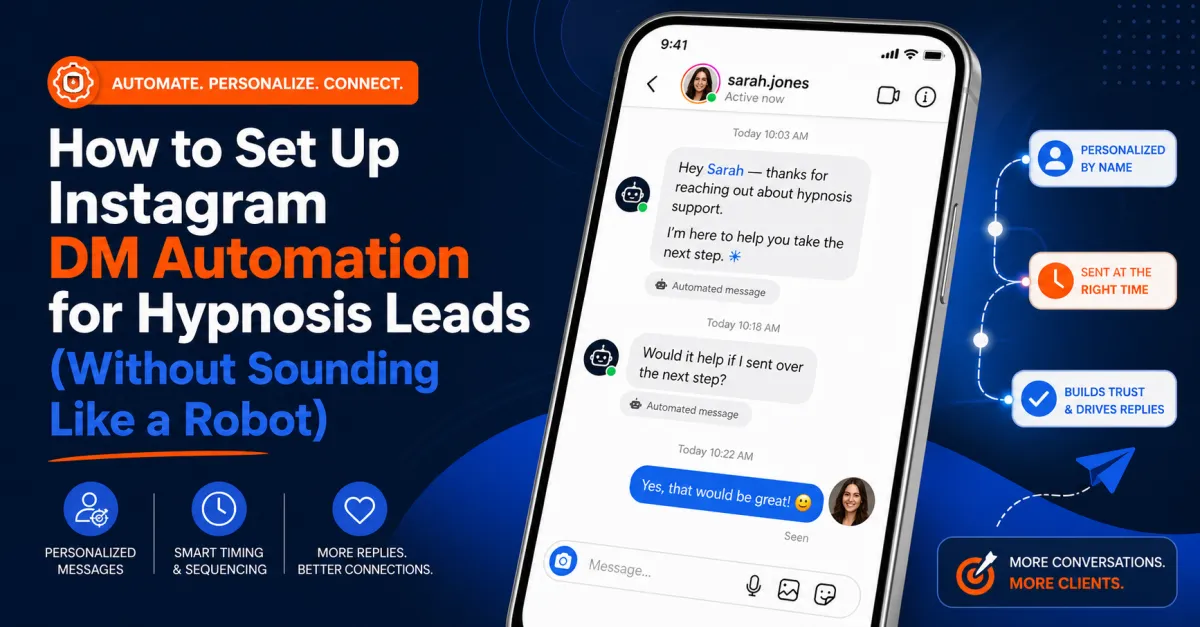
"Hi Sarah! Thanks for reaching out about hypnosis sessions..."
Same automation. Different personalization for every single person. Zero extra work.
The Message Structure That Keeps People Talking
Here's the third secret: Don't dump, don't sell—ask.
Mary's original automated message was a big paragraph explaining everything about her sessions. Information overload. People shut down.
Here's the better approach:
Message 1 (after 60-second wait):
"Hi {{contact.first_name}}! So glad you're interested. Quick question—what change are you looking to make in your life?"
That's it. Short. Personal. Open-ended.
Notice what we did:
Used their name (personalization)
Expressed enthusiasm (humanity)
Asked an open-ended question (engagement)
Didn't sell anything (trust-building)
Now they respond with something like: "I want to quit smoking" or "I need help with anxiety" or "I want to lose weight."
Perfect. Now you have context.
The Follow-Up Sequence That Actually Converts
Message 2 (sent after they respond):
"That's exactly what I help people with! I've worked with [X number] of clients who've had amazing results with [their specific issue]. Have you ever experienced hypnosis before?"
Again, notice the structure:
Acknowledge their specific need
Establish credibility
Ask another question to keep the conversation flowing
If they say "No, never tried it" → Send them to educational content
If they say "Yes, but it didn't work" → Address that objection with a different resource
If they say "Yes, and it was great" → They're pre-sold; move to booking
Message 3 (the booking message):
"Awesome! I'd love to chat with you about how we can make this happen. I have a few spots open this week for a quick discovery call. You can grab a time that works for you here: [calendar link]"
No pressure. No phone number required. Just value and an easy next step.
The Advanced Move: Split the Message
Here's a ninja tactic: Instead of sending one message, split it into 2-3 shorter messages sent a few seconds apart.
Message 1: "Hi Sarah! 👋"
Message 2 (5 seconds later): "So glad you're interested in the hypnosis sessions."
Message 3 (5 seconds later): "Quick question—what change are you looking to make in your life?"
Why does this work? Because it mimics how real people text. We don't type one giant paragraph and send it. We send shorter thoughts in sequence.
This technique dramatically increases the "human feel" of your automation.
Setting This Up in Your System
If you're using Instagram's built-in automation tools, you're limited. You can set up ONE automatic response to a specific comment keyword (like "BOOK"), but that's about it.
For true conversation automation, you need a proper CRM with social media integration. Here's what to look for:
Required Features:
Instagram DM integration (triggers when someone messages you)
Wait steps (to add realistic delays)
Merge fields (for personalization)
Conditional logic (different responses based on their answers)
Calendar integration (so they can book directly)
Platforms like GoHighLevel, ManyChat, or similar tools offer these features.
In the Pykthos platform specifically, here's how you'd set it up:
Step 1: Go to Automation → Workflows → Create New Workflow
Step 2: Set trigger as "Instagram DM Received"
Step 3: Add "Wait" action (60 seconds)
Step 4: Add "Send Message" action with your personalized text using {{contact.first_name}}
Step 5: Add another "Wait" action (this time waiting for their response)
Step 6: Add conditional branches based on keywords in their response
Step 7: Add your follow-up messages and calendar link
Total setup time? About 30 minutes. Time saved per month? Hours upon hours.
What About the Human Touch?
Here's what I tell everyone: Automate the beginning, personalize the middle, systematize the end.
Automate the beginning: Let the system handle the initial response and qualifying questions. This weeds out tire-kickers and gets real prospects engaged.
Personalize the middle: Once someone shows genuine interest (they respond 2-3 times), jump in as yourself. Take over the conversation. Build real rapport.
Systematize the end: Use automated calendar booking, payment links, and intake forms. No back-and-forth scheduling emails.
You're not replacing yourself. You're amplifying your ability to have meaningful conversations with people who actually want your help.
The Metrics That Matter
Once you've set this up, track these numbers:
Response Rate: What % of people who DM you actually respond to your first automated message?
Conversation Length: How many messages back-and-forth before they book or drop off?
Booking Rate: What % of conversations turn into booked discovery calls?
Show-Up Rate: What % of booked calls actually happen?
If your response rate drops below 40%, your first message is probably too salesy or too robotic. Revise it.
If your booking rate is below 20%, you're not providing enough value or making booking easy enough.
If your show-up rate is below 70%, add more automated reminders before the call.
Common Mistakes to Avoid
Mistake #1: Asking for their phone number too early
Don't do this. You don't need their phone number anymore. Send them a calendar link. They book directly. Much lower friction.
Mistake #2: Sending walls of text
Keep messages short. Three sentences max. If you need to share more information, send them to a video or webpage.
Mistake #3: Automating everything
Some conversations need the human touch. Know when to step in. If someone asks a complex question or expresses significant hesitation, take over manually.
Mistake #4: Using yes/no questions
These kill conversations. "Have you tried hypnosis before?" gets a one-word answer. "What's been your experience with hypnosis?" starts a dialogue.
Mistake #5: Forgetting to test
Before you turn on any automation, test it yourself. DM your own account from a friend's phone. See what the experience feels like. Adjust accordingly.
Your 7-Day Implementation Plan
Day 1: Audit your current DM process. How many DMs do you typically get? What questions do people ask? What do you usually say?
Day 2: Choose your automation platform and set up the integration with Instagram.
Day 3: Write your message sequence (first response, follow-up question, booking message).
Day 4: Build the automation workflow with proper wait steps and personalization.
Day 5: Test everything thoroughly. Send test messages from different accounts.
Day 6: Turn it on for real prospects. Monitor closely.
Day 7: Review results and tweak messages based on what's working.
The Bottom Line
Instagram DM automation isn't about replacing human connection. It's about scaling your ability TO connect.
Instead of spending 2-3 hours per day typing the same responses, you spend 30 minutes per day having meaningful conversations with qualified prospects who've already been warmed up by your automation.
Your time gets freed up for what matters: actually helping people change their lives.
And isn't that why you became a hypnosis practitioner in the first place?
Ready to Automate Your Practice?
Want help setting up automation systems that actually work for your hypnosis practice? Join us in the Pykthos Mastermind where we'll walk you through the exact tech setup, message templates, and strategies that convert. Check out: https://pykthos.com/mastermind to learn more.


