



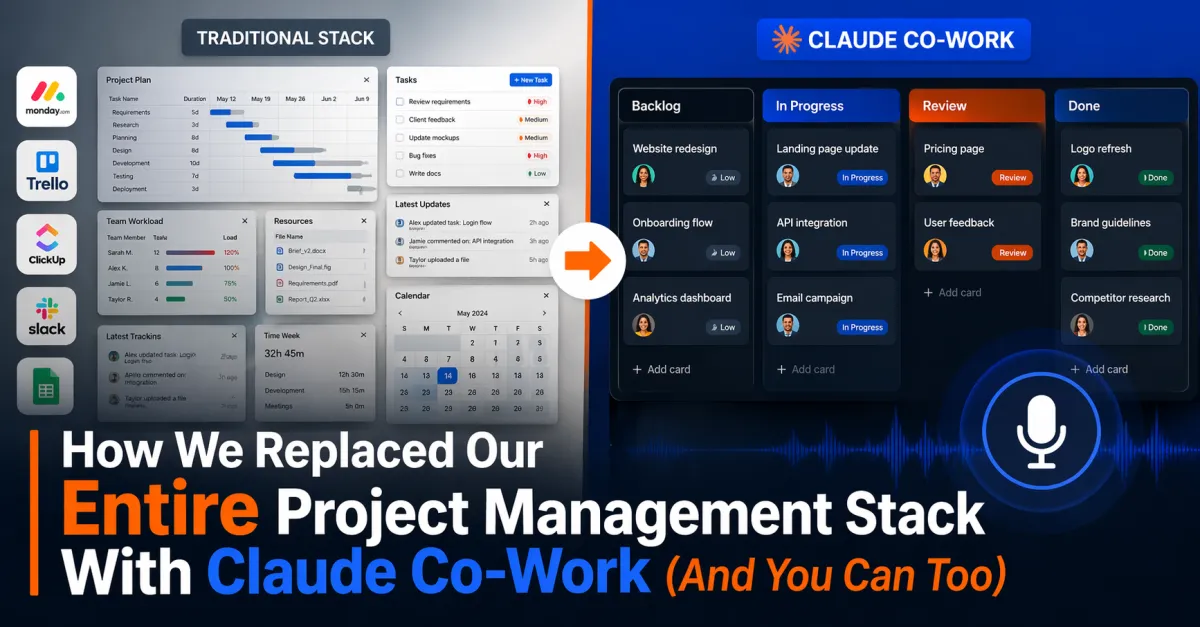
How We Replaced Our Entire Project Management Stack With Claude Co-Work (And You Can Too)
On our March 18th mastermind call, Timothy dropped something that made everyone stop and pay attention.
"I absolutely suck at project management," he said. "And I absolutely hate all the project management tools. They're just bloated."
Then he showed us what he'd built instead.
In 15 minutes of conversation with Claude, he'd created a fully functional project management system that lives right on his desktop. No subscriptions to Trello, Asana, or Monday.com. No logging into web apps. No fighting with interfaces designed for enterprise teams.
Just a simple, elegant system that actually works the way his brain works.
Let me show you exactly what he built and how you can replicate it.
The Problem With Traditional Project Management Tools
Timothy put it bluntly: "They're bloated, there's so much, I gotta sign up for this shit, I don't want to deal with that."
He's not wrong. Most project management tools are designed for teams of 50+ people with complex hierarchies and elaborate workflows. If you're a solo hypnosis practitioner or running a small practice, you don't need 90% of what these tools offer.
What you need is something simple that:
Captures your tasks quickly
Shows you what needs attention
Doesn't require logging into yet another platform
Actually gets used (instead of abandoned after two weeks)
That's exactly what Claude Co-Work delivers.
What Is Claude Co-Work?
Claude Co-Work is part of Anthropic's Claude Pro subscription. When you download the Claude desktop app, you get access to Co-Work, which does something revolutionary:
It works directly in a folder on your computer.
Not in a web browser. Not in some cloud interface. Right there in a folder you create and control.
Claude can create files, modify them, and build entire systems based on your spoken instructions. You literally talk to it like you'd talk to an assistant.
As Chris noted during the call: "You can literally record Loom videos, or any kind of screenshot-style video, and there are apps that will go and make a guidebook for you, including screenshots automatically from your recording."
But Co-Work takes this further. It doesn't just document—it builds.
The 15-Minute Build: What Timothy Created
Here's what Timothy told Claude:
"I absolutely hate everybody's project management solutions. Can we just make an HTML file that has all my project management in it?"
Claude responded: "Yeah, obviously."
Fifteen minutes later, Timothy had:
1. A Kanban Board Dashboard
A beautiful HTML interface showing all his projects organized by status. He can drag and drop tasks between columns. It updates in real-time.
2. A Tasks.md File
This is the single source of truth. Every task lives here in simple Markdown format. Human-readable, machine-parsable.
3. A Memory Folder
Claude maintains context about:
Team members and their roles ("Liesl, you're in here because you're working on my book")
Active projects across all his companies
Company-specific information and workflows
4. Automated Daily Digests
Every morning at 8 AM, Claude sends Timothy a Slack message with everything that needs attention that day.
During the demo, Timothy showed us his actual morning digest:
"Hey, quick check, you know, make sure that you check our ad campaigns, that's something that you and I didn't do, so I need to push that back. You want to be ready for a report on performance, because Chris and I had a meeting today. And also, I have to book my flights, so I haven't done that."
It even included: "Do something nice for your wife."
Timothy laughed: "Yeah, I asked Claude to remind me to be a better husband. And it does."
The Magic: How Adding Tasks Actually Works
This is where it gets impressive. During the call, Chris asked Timothy to demonstrate adding a task in real-time.
Timothy unmuted himself and said:
"Hey, Claude, under the PYKTHOS, P-Y-K-T-H-O-S, what I need you to do is add a task. I'm going to be building out a discovery call, what we'll call a little mini engine. And what this is, is it's going to be a full discovery call snapshot built for GoHighLevel, and it's going to have everything from how exactly we're going to use the business readiness survey to then guardrail and filter out the unqualified people from the call, to then offer them the call. So I need to build out everything from the funnel pages that include the landing page, the calendar, the form, I need the thank you page, and all the follow-up email sequences. And if you can put that on my reminder list to look at next week and discuss during the Monday Pick Those Morning call at 8:30am, that would be great."
That entire riff—probably 45 seconds of talking—and Claude:
1. Extracted all the relevant details
2. Added it to the tasks.md file
3. Regenerated the HTML dashboard
4. Scheduled it for the Monday morning call
No forms to fill out. No clicking through menus. Just talking.
Chris's reaction: "That's way more than I expected you to say, but perfect."
The Slack Integration That Solves the Mobile Problem
Here's the catch: Claude Co-Work only runs on desktop. You can't use it from your phone.
But Timothy found a brilliant workaround.
He created a private Slack channel just for him and Claude. Throughout the day, he sends messages to that channel:
"Just finished editing the homepage video"
"Need to remember to follow up with Liesl about the book project"
"Add to my task list: write email sequence for new members"
Claude checks that Slack channel every few hours and automatically updates the task list based on those messages.
Even better? When team members report completed work in Slack, Claude picks up on it and marks tasks complete automatically.
Timothy explained: "If my team member Ross sends me a Slack message saying 'Hey, that video edit is done,' Claude picks up on that context and marks the task complete in my dashboard."
It's a living document that updates itself.
The Family Use Case: Beyond Business
This is where Timothy really blew our minds.
He set up a completely separate Claude Co-Work instance for his family.
They have a device in their kitchen called a Skylight—basically a digital picture frame with a calendar. The app for managing it is terrible.
Timothy discovered the Skylight connects to Google Calendar. So he:
1. Set up a family Slack channel
2. Connected Claude to that channel
3. Had Claude monitor for messages starting with "Hey Claude"
4. Configured Claude to update their Google Calendar
5. Google Calendar syncs to the Skylight
Now anyone in his family can say: "Hey Claude, this is what I have in the fridge, help me cook dinner" or "Hey Claude, add to the family calendar that we're cleaning the house on Saturday."
Claude processes the request, updates Google Calendar, which syncs to the Skylight downstairs.
Timothy's summary: "I now have a synchronized system where anything I update automatically publishes from Slack into the skylight downstairs."
No apps. No complicated interfaces. Just natural conversation.
The Technical Architecture (Simplified)
For those wondering how this actually works:
File Structure:
One folder on your computer (synced to Google Drive for access anywhere)
tasks.md file (your task database in plain text)
memory folder (context about people, projects, companies)
HTML dashboard (the pretty visual interface)
How It Works:
Claude edits only the tasks.md file (single source of truth)
It then regenerates the entire HTML dashboard from that file
This prevents sync issues and hallucinations
Custom Instructions:
Claude uses a cods.md file for core instructions
That file can reference other instruction files
Instructions nest logically (task management, calendar integration, Slack interactions)
Chris noted during the call: "The instruction file could refer to other instruction files, right? So it says, like, hey, whenever we're doing such and such a task, always read such and such markdown file, and that's a new, like, subset of instructions."
Why This Works Better Than Traditional Tools
Daniel asked a critical question during the call: "I tried to create this type of a system in ChatGPT, but I was running into a lot of hallucination... Have you run into any issues where it kind of drops anything, or it hallucinates?"
Chris responded: "I have not seen hallucination. I have seen it mix some stuff up, but we bug-fixed it."
The key was architectural: "It was editing two files, and I was making a mistake here and there, and I was like, well, why'd that happen? It goes, oh, you know why? Because we're editing both. Instead, what I should do is edit the database single source of truth, and then I'll update my instructions that it always fully regenerates the whole HTML file from the database, and that completely solved the problem."
Single source of truth = no hallucinations.
Traditional project management tools fail because:
1. They require you to adapt to their system
2. They lock your data in their platform
3. They can't think contextually
Claude Co-Work succeeds because:
1. The system adapts to how you think
2. Everything lives as simple files you own
3. Claude understands context and relationships
Getting Started: Your First Steps
If you want to build something similar, here's the path:
Step 1: Get Claude Pro
You need the pro account to access Co-Work. Download the desktop app.
Step 2: Create Your Folder
Make a single folder on your computer. Only give Claude access to that folder.
Step 3: Start Simple
Tell Claude: "I need a task management system that tracks my daily to-dos, categorizes them by project, and gives me a visual dashboard."
Step 4: Let Claude Build
It will create the initial structure. Review it. Ask for modifications.
Step 5: Start Using It
Talk to Claude naturally: "Add this to my list." "Mark that as complete." "Show me everything due this week."
Step 6: Iterate
As you use it, you'll discover what you need. Ask Claude to add those features.
Timothy mentioned during the call that he'd be sharing documentation: "I dropped the document in the chat on how you guys can build the same thing I did, so Chris, if you want to include that, you can download it, and then we'll include it with the show notes."
The Bigger Picture: Conversational Work
Chris summed up why this matters:
"We're witnessing a fundamental shift in how work gets done. The old model: You adapt to software. You learn interfaces. You click through menus. You fight with forms. The new model: Software adapts to you. You speak naturally. The system builds itself around your needs."
This isn't just about project management. It's about a completely different way of working with technology.
Instead of learning how to use tools, you describe what you need and the tools build themselves.
Real-World Application: The PYKTHOS Example
During the call, we discussed our own Big Three projects for the quarter. Chris and Timothy are building a "Mini Machine" snapshot for PYKTHOS members—a complete funnel template with all the automation pre-built.
Chris explained: "We could literally build every piece of it, all interconnected with all the tags, the automation sequences, the funnels, put it in a little thing called a snapshot, and say, here you go. It's now in your account."
But here's the thing: even with just two major projects this quarter, each one contains dozens of sub-tasks.
That's where Claude Co-Work shines. You can riff about the entire project, and Claude organizes it into actionable steps.
You don't need to think about project management. You just think about the work, and Claude handles the organization.
The Cost-Benefit Analysis
Let's be practical. Claude Pro costs money (pricing varies by region and plan).
Compare that to:
Asana: ~$11/user/month
Monday.com: ~$12/user/month
ClickUp: ~$9/user/month
Plus the mental overhead of learning and maintaining those systems
With Claude, you get:
Project management
An AI assistant for writing and strategy
Custom system building
No learning curve (you just talk)
Chris put it simply: "For the price of two lattes, you get an intelligent assistant that builds custom systems exactly how you need them. The juice is absolutely worth the squeeze."
Common Questions and Concerns
Q: What if I'm not technical?
That's the point. You don't need to be. You just describe what you need in plain English.
Q: What if Claude makes mistakes?
It will, occasionally. But because everything is in simple text files, mistakes are easy to spot and fix. Just tell Claude what went wrong.
Q: Can I access this from my phone?
Not directly, but the Slack integration solves this. You can manage everything via mobile by sending messages.
Q: What if I want to share this with my team?
You can. The files live in a folder you can share via Google Drive or Dropbox. Multiple people can interact with the same system.
Q: Is my data secure?
Yes. Everything lives on your computer (and your chosen cloud backup). You're not storing sensitive information on someone else's servers.
The Future of Business Operations
Terrence commented during the call: "An AI that knows all that can work as a guide. Just get through it."
That's exactly where we're headed. Not AI replacing humans, but AI handling the organizational grunt work so humans can focus on the creative and strategic elements.
Chris's vision: "The key is using it in a way that will create more human conversations. And if we can start those human conversations, then boom."
AI handles the systems. You handle the relationships.
That's the future of running a hypnosis practice—or any small business.
Your Next Step
If you're drowning in project management tools that don't work, or if you've been avoiding systems altogether because they feel too complicated, try this:
Spend one hour with Claude Co-Work. Just one hour.
Describe your ideal task management system. Let Claude build it. Start using it.
You might be surprised at how quickly something that felt impossible becomes your new normal.
As Timothy demonstrated on our call, you can go from "I hate all these tools" to "I built exactly what I need" in about 15 minutes of conversation.
The technology is ready. The question is: are you ready to work differently?


