




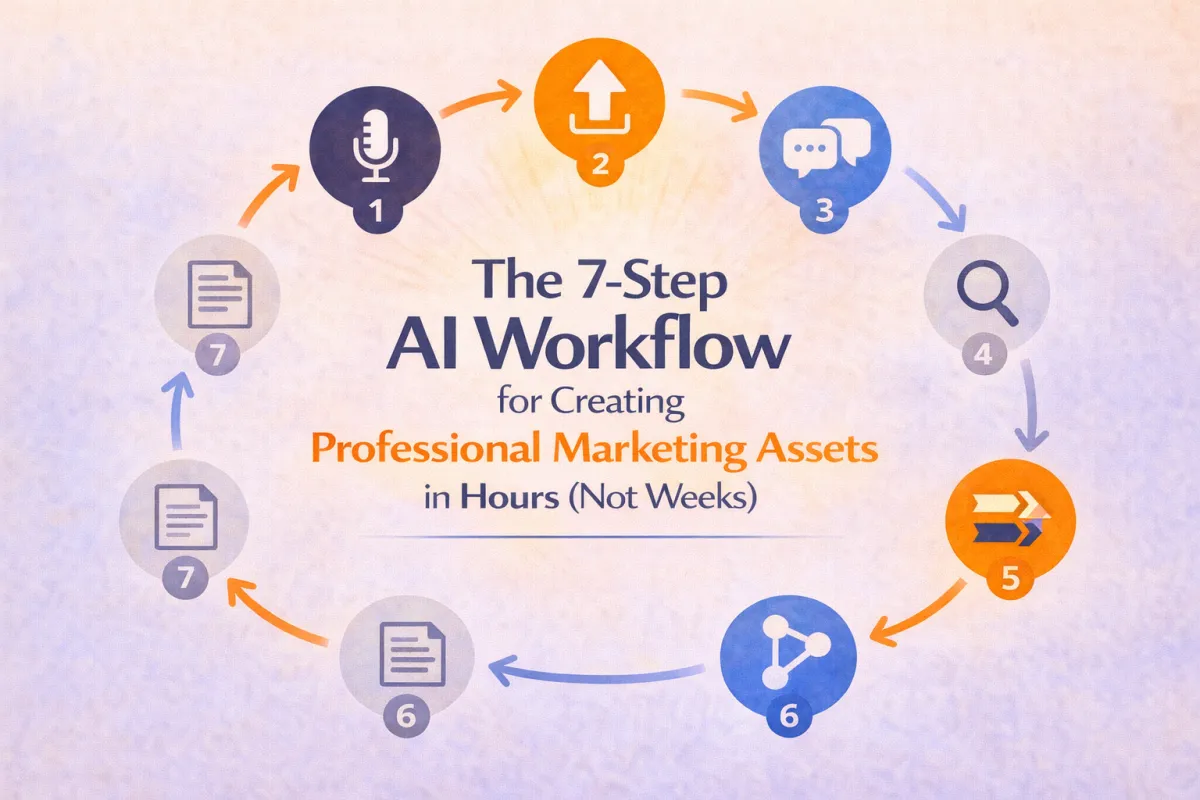
The 7-Step AI Workflow for Creating Professional Marketing Assets in Hours (Not Weeks)
Stop me if this sounds familiar: You know you need to create that lead magnet, write those email sequences, plan that webinar, or film that course. But every time you sit down to actually do it, the blank page stares back at you, mocking your procrastination.
What if I told you there's a systematic way to go from zero to finished marketing asset in a single morning?
Not "good enough" content. Not rough drafts that need weeks of editing. Actually finished, professional-quality content that's ready to use.
Here's the exact 7-step workflow I use, broken down so you can replicate it today.
Step 1: The Brain Dump Riff (5-10 Minutes)
What you're doing: Getting all your messy, unorganized thoughts out of your head and into a format AI can work with.
The tools I use:
Meta AI sunglasses (or any Bluetooth headset)
Otter.ai for transcription
Alternative: Just use ChatGPT's voice mode
How to do it:
Don't write anything. Just talk. Imagine you're explaining your project to a smart colleague who's going to help you build it.
Here's my template for starting:
"Hey [AI name], I'm working on [project type]. The goal is [outcome]. My target audience is [description]. I'm thinking [initial ideas]. What I'm not sure about is [challenges]. Here are some things I know work well: [examples]."
Real example from my webinar project:
"Hey Atlas, I'm here with Mike. We're discussing the teaching portion of what will ultimately be a sales webinar. We want to start doing monthly live webinars to sell lifetime access to MMHA. We're not worried about the sales portion yet. What I'm going to do is give you the full transcript of a class that Mike and I did for our members..."
Notice: I'm not being formal. I'm not writing in complete sentences. I'm just thinking out loud.
Pro tip: If you get stuck, ask yourself these questions out loud:
What problem am I trying to solve?
Who is this for?
What do I want them to feel/think/do?
What have I already tried that worked?
What am I afraid won't work?
Step 2: The Context Upload (2-3 Minutes)
What you're doing: Giving AI access to any existing materials that provide context.
What to upload:
Previous versions or related content
Transcripts from relevant meetings or presentations
Chat logs from brainstorming sessions
Customer feedback or testimonials
Competitor examples you want to reference
For my webinar, I uploaded:
Full Zoom transcript from a previous training Mike and I did
The chat transcript from that same training
Nothing else—I kept it simple
Important: You don't need perfect materials. A messy transcript is better than no transcript. Raw notes are better than no notes.
Pro tip: When uploading, tell the AI specifically what you want it to do with the materials. For example:
"I'm attaching the transcript of a class. Go through it and help extract what you think will be the hidden nuggets of gold that would make the best webinar for teaching beginners."
Step 3: The Extraction Conversation (10-15 Minutes)
What you're doing: Having a back-and-forth conversation where AI helps you identify the best ideas and structure.
The key principle: Ask open-ended questions that let AI do heavy analytical lifting.
Questions I ask:
"What stands out as the most valuable insights here?"
"What's missing that the audience would need to know?"
"How would you structure this to be most obviously useful?"
"What objections or concerns should we address?"
"If you were attending this [webinar/course/training], what would make you go 'aha!'?"
Real exchange from my session:
Me: "Should we work in some cool details from stage hypnosis, like Mike's jokes about not asking pregnant women to volunteer?"
Atlas: "Yes! That's perfect for debunking myths and adding humor. Here's how to position it..."
What NOT to do:
Don't just accept the first output
Don't ask yes/no questions (ask "how" and "what" instead)
Don't move on until you genuinely understand the AI's reasoning
Pro tip: If the AI gives you something that feels generic, push back. Say: "This feels a bit generic. What would make this specifically powerful for [your unique situation]?"
Step 4: The Deep Research Prompt Generation (5 Minutes)
What you're doing: Instead of doing research yourself, you're creating a research assignment for AI.
This is the game-changer step most people miss.
Here's exactly what I say:
"I want you to give me a prompt to create a deep research report that will be highly likely to be the most obviously useful output for [this project]. The report should help us understand [specific aspects you need to know]."
For my webinar, I specified:
Target audience analysis (beginners and those lacking confidence)
Best practices for teaching webinars
Psychological principles for adult learning
How to balance teaching vs. selling
What you'll get:
A comprehensive, multi-paragraph prompt that you can copy and paste directly into a new AI conversation for deep research.
The AI will structure the research prompt to include:
Specific deliverables
Audience deep dives
Competitive analysis
Psychological frameworks
Output format specifications
Pro tip: Save good research prompts. I keep a Google Doc of research prompts that worked well, so I can modify them for future projects.
Step 5: The Parallel Deep Research (10-15 Minutes of AI Work, 0 Minutes of Your Time)
What you're doing: Running the research prompt through multiple AI platforms simultaneously.
My approach:
1. Copy the research prompt
2. Paste it into ChatGPT (deep research mode)
3. Paste it into Claude (deep research mode)
4. Go do something else while they work
Why multiple platforms?
Different AI models have different strengths:
ChatGPT tends to be comprehensive and structured
Claude tends to be nuanced and consider edge cases
Gemini tends to be great with documents and integration
Using multiple platforms gives you a more complete picture.
What I did: Started the research reports, then went shopping with my kids. By the time I got back, both reports were complete.
Time savings: What would have taken me 3-4 hours of manual research took 15 minutes of AI processing time.
Step 6: The Synthesis Feedback Loop (10-15 Minutes)
What you're doing: Bringing the research back into your original conversation and asking AI to integrate the insights.
This is crucial: Don't just read the research reports and try to apply them yourself. Let AI do the synthesis.
Here's exactly what I did:
1. Downloaded both research reports
2. Went back to my original conversation with Atlas
3. Uploaded both reports with this simple prompt:
"I got ChatGPT and Claude to both run that prompt. I'm attaching the reports here. Are they useful?"
What happened next:
Atlas evaluated both reports, identified:
What was strong about the ChatGPT version
What was strong about the Claude version
What was missing from both
How to combine the best insights
What to discard as too academic or not applicable
Then it asked ME clarifying questions:
"The weakness is none of this makes it uniquely Mike. How are you handling that?"
"Is this too light on teaching content?"
"Should we include more technical depth or keep it accessible?"
Pro tip: This is where your expertise matters most. AI can synthesize information, but YOU know your audience, your style, and your goals. Answer these questions from your gut.
Step 7: The Formatted Output (5 Minutes)
What you're doing: Getting AI to produce a final, formatted version that's truly ready to use.
The secret technique: Ask for "fenced markdown."
Here's my exact prompt:
"This is great. What I'd like you to do is create a Google Doc and give me fenced markdown of the entire structure of the [project]. Include everything you already gave me, with your guardrail advice and the flexibility points we discussed."
What is fenced markdown?
It's a formatting system that lets you copy from AI and paste directly into Google Docs, Microsoft Word, or Notion with proper:
Headers and subheaders
Bullet points and numbered lists
Bold and italic formatting
Spacing and structure
How to use it:
1. AI generates the content in a code block
2. You click "copy" on the code block
3. In Google Docs, right-click and select "Paste from Markdown"
4. Everything formats perfectly
No cleanup needed. No reformatting. No fixing weird spacing. It just works.
Pro tip: In Google Docs, you may need to enable Markdown pasting in your settings. Just Google "how to paste markdown in Google Docs" if you can't find the option.
The Complete Workflow in Practice
Let me show you how this worked for two completely different projects:
Project 1: Sales Webinar (This Morning)
8:30 AM: Started riffing with Mike about webinar concept (10 minutes)
8:40 AM: Uploaded previous training transcript (2 minutes)
8:45 AM: Had extraction conversation with AI (15 minutes)
9:00 AM: Generated and ran deep research prompts (5 minutes of my time)
9:05 AM: Left to go shopping while AI generated reports
1:00 PM: Returned, uploaded research back to conversation (3 minutes)
1:03 PM: Synthesis conversation with clarifying questions (12 minutes)
1:15 PM: Requested and received formatted output (3 minutes)
Total active time: About 50 minutes
Result: Complete webinar teaching structure ready for Mike to add his stories and examples
Project 2: Platform Onboarding Redesign (Earlier This Week)
Location: Target store, waiting while kids shop
Process:
Riffed into my phone about onboarding problems (10 minutes)
Later: Had conversation with AI about solutions (15 minutes)
Generated research prompt on SaaS onboarding best practices (5 minutes)
Ran research through ChatGPT (passive time)
Synthesized research into "quest" based onboarding system (15 minutes)
Got formatted output as project brief (5 minutes)
Total active time: About 50 minutes
Result: Complete redesign of onboarding as gamified "quests" that reduce overwhelm
The Tools You Actually Need
For voice riffing:
Otter.ai (free tier is fine)
Or: ChatGPT voice mode
Or: Any voice recorder + transcript tool
For the AI work:
ChatGPT Plus ($20/month) - Essential for deep research and custom GPTs
Claude Pro ($20/month) - Optional but recommended for writing quality
Gemini Advanced (included with Google Workspace) - Great for document work
For formatting:
Google Docs (free)
Or: Microsoft Word
Or: Notion
Total cost: $20-40/month depending on how many AI subscriptions you want
Common Mistakes to Avoid
Mistake #1: Trying to Write Perfect Prompts
Stop agonizing over prompt engineering. Just talk like a human. The back-and-forth conversation is more powerful than any single perfect prompt.
Mistake #2: Accepting First Outputs
AI's first response is rarely its best response. Push back. Ask "why?" Request alternatives. This isn't being difficult—it's being collaborative.
Mistake #3: Not Using Context-Aware AI
If you're re-explaining your business context in every conversation, you're wasting time. Create custom GPTs or Gems that know your business, your audience, and your style.
Mistake #4: Skipping the Research Step
The deep research step is what transforms good output into great output. It brings in perspectives and frameworks you wouldn't have thought of.
Mistake #5: Trying to Do It All in One Session
Some steps benefit from mental breaks. Start the research, go do something else, come back fresh. Your subconscious will process while AI works.
How to Apply This to Your Projects
For a course curriculum:
Riff about your expertise and what students need to learn
Upload any existing materials or outlines
Extract the core learning objectives
Research adult learning principles and course structure best practices
Synthesize into module breakdown
Get formatted course outline
For email sequences:
Riff about your customer journey and what they need at each stage
Upload customer feedback and previous successful emails
Extract emotional triggers and pain points
Research email marketing best practices for your industry
Synthesize into email sequence with subject lines
Get formatted email copy
For social media content:
Riff about your expertise and what value you can provide
Upload past posts that performed well
Extract themes and formats that resonate
Research content trends and platform best practices
Synthesize into content calendar
Get formatted posts with captions
For lead magnets:
Riff about the transformation your audience wants
Upload customer questions and objections
Extract the core value proposition
Research lead magnet formats and conversion optimization
Synthesize into outline and content
Get formatted lead magnet copy
The Mindset Shift Required
This workflow requires you to think of AI differently.
It's not a tool that does work FOR you. It's a collaborator that works WITH you.
You bring:
Domain expertise
Understanding of your audience
Strategic judgment
Quality evaluation
AI brings:
Rapid information synthesis
Pattern recognition across vast knowledge
Structure and organization
Tireless iteration
Together, you move at speeds that seemed impossible just a year ago.
Your Action Plan for Today
Pick ONE project you've been stuck on. Just one.
Set a timer for one hour.
Follow these seven steps:
1. Riff for 10 minutes
2. Upload any context (5 minutes)
3. Extract insights through conversation (15 minutes)
4. Generate research prompt (5 minutes)
5. Run research (let it process while you do something else)
6. Synthesize the findings (15 minutes)
7. Format the output (5 minutes)
You'll have something real by the end of that hour. Not perfect. But real. Actionable. Actually useful.
Then iterate tomorrow.
That's how you go from stuck to shipping.
Welcome to the 5% who are using AI effectively.
And an even bigger welcome to those of you who join the Pykthos Mastermind, where we “riff” on all things business, marketing, and what-is-actually-working-right-now in 2026 and beyond! Check us out here: https://pykthos.com/mastermind


